Pages

Monday, May 06, 2013

Task and Maintenance Leadership Functions


Typical task leadership functions are:
  • Preparing an agenda
  • Recommending objectives
  • Determining key questions
  • Suggesting ways to accomplish specific objectives
  • Clarifying information
  • Moving the group to action or decision-making
  • Recording information and decisions
  • Opening and closing meetings.
Typical maintenance (emotional) leadership functions are:
  • Welcoming and introducing people
  • Actively listening to people's ideas
  • Including everyone in discussions
  • Encouraging shy and quiet people to speak
  • Thanking people for contributions and coming to meetings
  • Giving positive feedback to speakers.
If you suspect that your organization does not have a good balance between task and maintenance leaders, watch a few meetings to observe the dynamics. If it seems to be short on one kind of leader, actively seek people who provide a balance.


Wednesday, December 12, 2012

Exposing WCF Service wsHttpBinding to SoapUI

Testing a WCF Service with wsHttpBinding in SoapUI gives you the following error:
The message could not be processed. This is most likely because the action ‘[Insert Web Service Action Here]’ is incorrect or because the message contains an invalid or expired security context token or because there is a mismatch between bindings. The security context token would be invalid if the service aborted the channel due to inactivity. To prevent the service from aborting idle sessions prematurely increase the Receive timeout on the service endpoint’s binding.


<bindings>
  <wshttpbinding>
    <binding name="wsHttpBinding_NoSecurity">
      <security mode="None">
        <transport clientcredentialtype="None">
          <message establishsecuritycontext="false">
          </message>
        </transport>
      </security>
    </binding>
  </wshttpbinding>
</bindings>


This is simply because SoapUI doesn't support security context tokens. Add these lines in Web.config:
Make sure that SoapUI has WS-Addressing set to true. Now you can test your WCF Service via SoapUI. However, you must be aware of the security implications using this approach.

Thursday, September 20, 2012

C# Builder Pattern

So I have been learning C# lately and trying to apply some concepts from Joshua Bloch's Effective Java 2.

The builder pattern.
  
using System;
using System.Collections.Generic;
using System.Linq;
using System.Text;

namespace PaymentLibrary
{
    public sealed class CardType
    {
        public string Id { get; private set; }
        public string Name { get; private set; }
        public string IssueFlag { get; private set; }
        public IList<int> Lengths { get; private set; }
        public IList<string> Prefixes { get; private set; }

        private CardType()
        {
        }

        public sealed class Builder
        {
            private string id;
            private string name;
            private string issueFlag;
            private IList<int> lengths = new List<int>();
            private IList<string> prefixes = new List<string>();

            public Builder WithId(string id)
            {
                this.id = id;
                return this;
            }

            public Builder WithName(string name)
            {
                this.name = name;
                return this;
            }

            public Builder WithLength(int length)
            {
                this.lengths.Add(length);
                return this;
            }

            public Builder WithIssueFlag(string issueFlag)
            {
                this.issueFlag = issueFlag;
                return this;
            }

            public Builder WithPrefix(string prefix)
            {
                this.prefixes.Add(prefix);
                return this;
            }

            public CardType Build()
            {
                CardType cardType = new CardType();
                cardType.Id = id;
                cardType.Name = name;
                cardType.IssueFlag = issueFlag;
                cardType.Lengths = lengths;
                cardType.Prefixes = prefixes;
                return cardType;
            }
        }
    }
}

Usage:
  
CardType cardType = new CardType.Builder()
                                    .WithId("MC")
                                    .WithName("Mastercard")
                                    .WithIssueFlag("N")
                                    .WithPrefix("49")
                                    .WithPrefix("56")
                                    .WithLength(16)
                                    .WithLength(18)
                                    .WithLength(19)
                                    .Build();

Wednesday, July 25, 2012

Brain as the tool of the spirit

The mind as the bridge between pure consciousness and the body in which that consciousness temporarily resides.


Thursday, June 21, 2012

The danger of sharing too much information

Information... Where does it go?

Everywhere...


Think twice before you share.

Friday, April 27, 2012

DNS Lookup in Java

A simple DNS lookup in Java
  
import java.net.InetAddress;
import java.net.UnknownHostException;

public class DNSLookup {
    
    public static void main(String... args) {
        InetAddress inet = null;
        try {
            final String host = "eradicus.blogspot.com";
            inet = InetAddress.getByName(host);
            System.out.println("DNS Lookup: " + host);
            System.out.println("IP Adress: " + inet.getHostAddress());
        } catch (UnknownHostException e) {
            e.printStackTrace();
        }
    }
}
By using the InetAddress API you will be able to obtain the IP address of the target.

Thursday, April 26, 2012

Reversing a linked list in C++

Linked list is one of the most popular data structures in Computer Science. Read more about linked lists [here]. In this entry we will write a function to reverse a linked list in C++ efficiently.
  
Link* reverse_list(Link* p)
{
    if (p == NULL)
    {
        return NULL;
    }

    Link* h = p;
    p = p->next;
    h->next = NULL;

    while(p != NULL)
    {
        Link* t = p->next;
        p->next = h;
        h = p;
        p = t;
    }

    return h;
}
Enjoy.

Thursday, March 24, 2011

Fiddler Web Debugging Proxy

Here's a useful tool for debugging web apps specifically running in IE versions 8 and below. This is not just limited to applications running on the browser though, it can listen to any application utilizing HTTP / HTTPS. You do not need to configure your proxy settings to redirect traffic, it just works on the fly.


IE 9 has Developer Tools in it, more info [here] just like FireBug for Firefox and Chrome Developer Tools.


It does not mean that we can not use it though. I would still recommend it for debugging HTTP / HTTPS communication to avoid looking at 3 different tools.

Wednesday, March 23, 2011

Number of Simultaneous Connections in IIS

So I have reached the testing phase of the anti CSRF / CSS / SQL Injection fixes for a classic ASP web application at work. Luckily it didn’t take me long enough to learn the language. My machine will be used for quality assurance purposes. I have encountered an error regarding the number of simultaneous connections made to my local IIS webserver while running OWASP CSRFTester Project.


The fix is simple; just increase the number of simultaneous connections for IIS using the command below:


Assuming your PWD is inetpub\adminscripts


cscript adsutil.vbs set w3svc/MaxConnections 40
iisreset

Sunday, March 20, 2011

Repair Windows 7 System Files

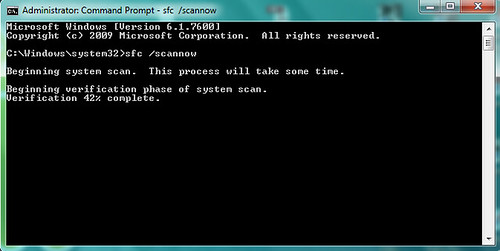
8 out of 10 average PC users have their box’s system files altered by malwares, viruses, etc. We usually reinstall the OS if the antivirus and anti malware software did not perform their job well. Here’s one way to fix the corrupted system files without the need of restarting your Windows 7 box.


1. Run the Command Prompt as Administrator
2. Type the following command


C:\Windows\system32\> sfc /scannow

repairsystemfiles


3. After the verification phase, you will receive a message about your system files’ integrity


Windows Resource Protection did not find any integrity violations.

Saturday, March 19, 2011

Android Intent

What is an Android Intent?


- functions like a verb
- something like “open contacts manager”, “search contacts”, “call contact”, and etc.
- I see it something like a description of a method / action to be performed
- used for starting other Activities


You can read more about this here: Android Intent

Monday, March 14, 2011

Android Activity

What is an Android Activity?


- one of the building blocks of an Android application
- used for rendering user interfaces that can respond to events
- a single screen
- can return a value to the previous activity
- pushed into a stack every time a new activity starts


You can read more about this here: Android Activity

Let’s help Japan

Help The Victims of the 8.9 Earthquake in Japan by Spreading Awareness and Aid. Visit http://goo.gl/wjZQz to donate.

Wednesday, February 16, 2011

HTTPS in Tomcat 6.0 Server

1. Create a self-signed server certificate using keytool. Take note of the keystore password, you will need it later on for setting up the server.


keytool -genkeypair -alias tomcat -keyalg RSA -keysize 1024
-dname "CN=localhost, OU=Group, O=Company Name, L=City, S=Region,
C=PH" -validity 365 -keystore keystore

2. Move the generated certificate file (keystore) to Tomcat’s conf directory.


3. Modify conf/server.xml


<Connector port="443" protocol="HTTP/1.1" SSLEnabled="true"
maxThreads="150" scheme="https"
secure="true" clientAuth="false"
sslProtocol="TLS"
keystoreFile="conf/keystore" keystorePass="your password" />

4. Restart Tomcat.


5. Visit this link https://localhost:443/. You will receive a warning about the self-signed certificate. If you want to get away with this warning, purchase a commercial certificate.

Monday, February 07, 2011

My New Android 1.6 / Debian Tablet Splash Screen

Logos are registered trademarks of their respective owners.
splash
Created using The GIMP.